
What every subscription has left, and how every Mac is doing, on one screen you can read across the room.
One dark, wall-sized board: how much of each AI subscription is used and when it resets, how every Mac is doing, and the fleet's own numbers. It only shows; it never steers.
- Accessibility documented
- Dark board for a wall display
Internal to Renkara. Telltale is a tool Renkara Media Group builds and runs for itself. It is not for sale, and there is nothing to buy or join.
A wall board for the fleet, with three promises kept.
Telltale is an instrument panel for a small fleet of Macs: an agent on each Mac reports to one hub, and the hub serves the board to a browser. It is internal to Renkara and is not offered for sale, and there is no install or download button on this site. The company, the people, the Macs, the providers, and every number in the screenshots are invented, and the board was running in demo mode when each picture was taken. These are the things it does.
Subscriptions and Macs on one dense screen
Every subscription, every limit, and when it resets
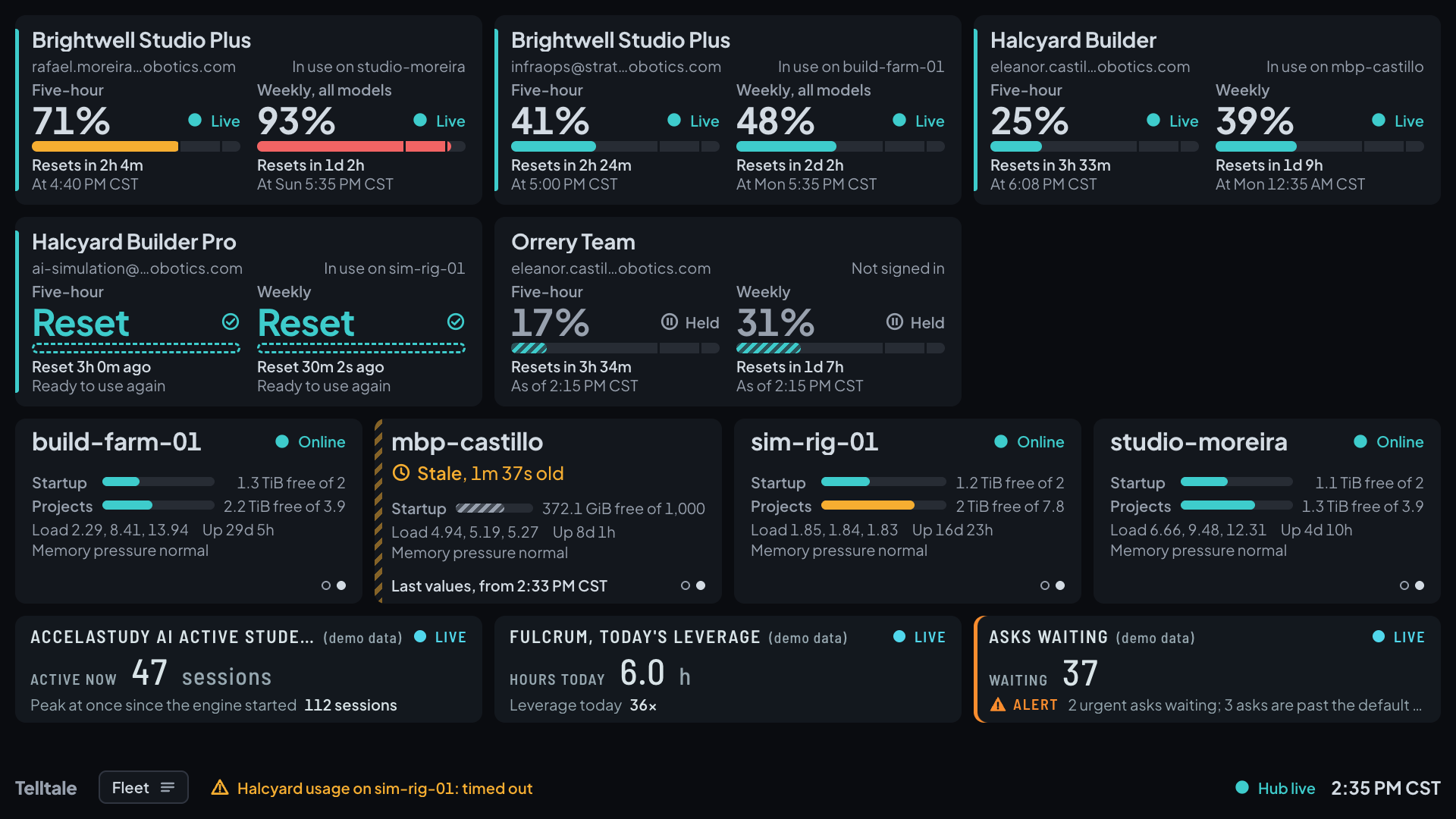
Each subscription is a card with its provider, plan, and account, and one meter for each limit: the percent used, a state word, a countdown to the reset, and the reset's clock time. A meter changes color as its limit fills. The cards here are three invented providers.
- Live, held, or reset, in words
- A reading is Live while it is fresh. When a Mac switches to another account, the old subscription keeps its last number marked Held, with the time it was read, and counts down to its reset. After the reset it reads Reset and Ready to use again, with no percent.
- Every Mac, with its CPU, memory, disks, and load
- A Mac card shows its state, each disk, the three load averages, uptime, and memory pressure, and it crossfades every 10 seconds between a view of CPU and memory and a view of disks and load. A Mac that stops reporting is marked Stale after 30 seconds and Offline after 5 minutes.
- The fleet's own numbers beside them
- Under the Macs, a tile for each fleet module shows one main number and one supporting line: today's leverage, the asks waiting, the active learner sessions. A tile that needs a look says why, in words.
- One screen before a second
- When the content runs over one screen by less than 15 percent, the board gives back spacing, a line at a time, before it adds a screen. A board that is far over rotates through screens on a set interval, with a crossfade between them.
Panels, large cards, and a picker
Module dashboards with the detail
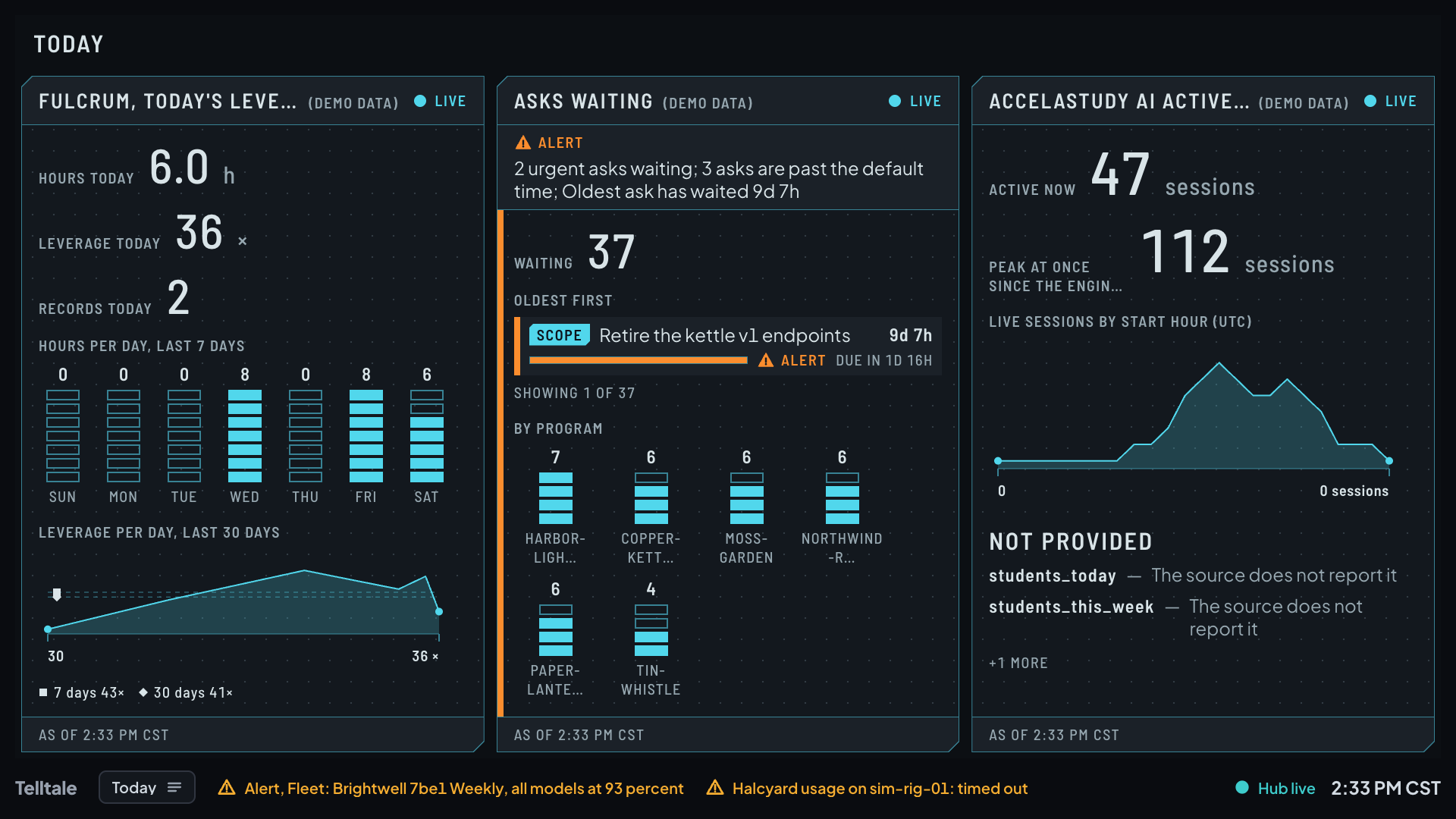
A dashboard of module panels takes the whole screen: a day's hours and leverage with seven and thirty days behind them, the asks waiting by age and by program, the sessions now and by course. Every panel's title ends with (demo data) when the hub is running on invented data.
- A panel says what its source did not give
- When a module's source leaves out a reading, the panel lists it under Not provided, with the reason, instead of drawing a zero. An asks panel puts its alert in words at the top.
Tap any card to open it large
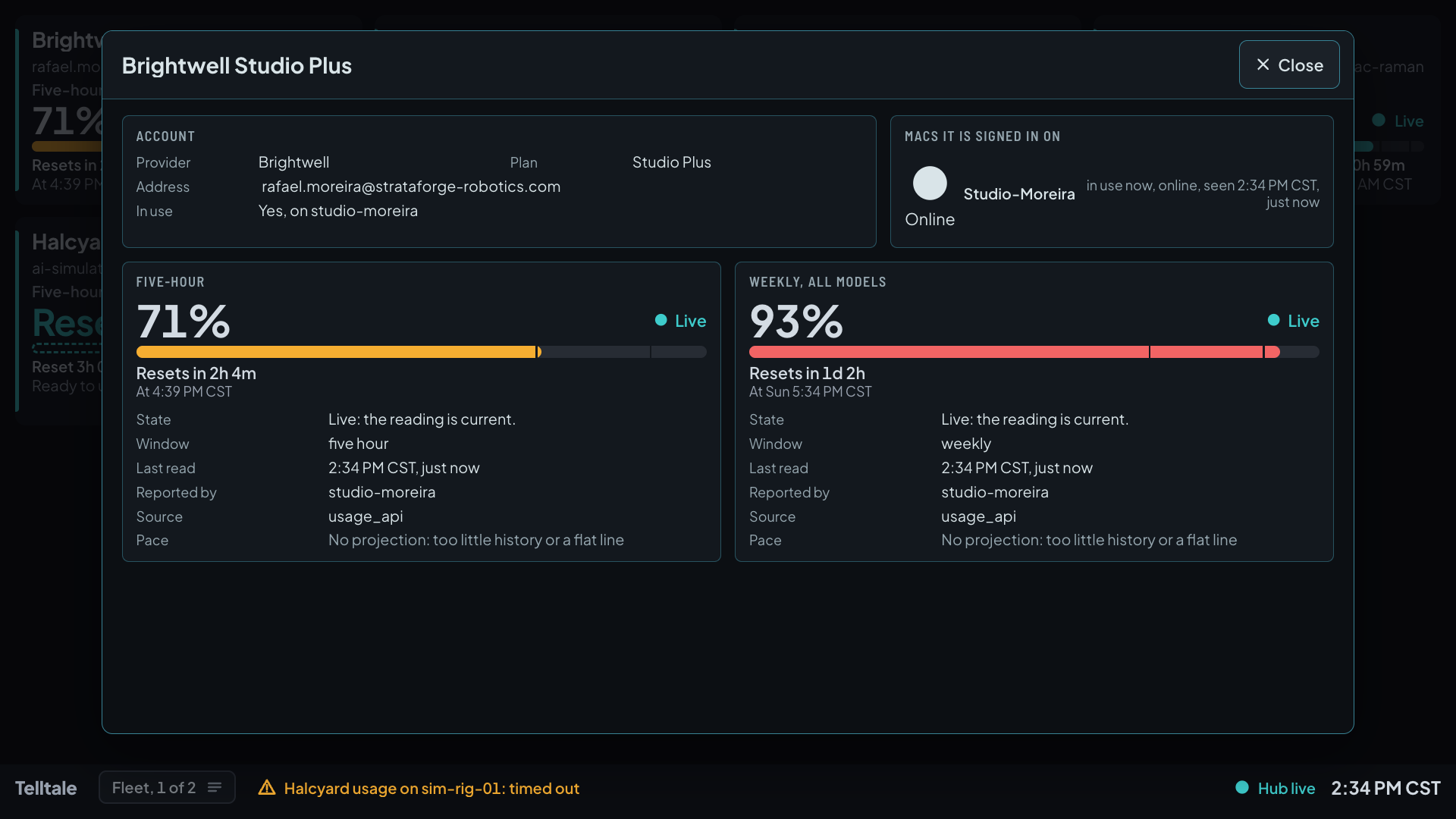
Every card and panel is a real button. A tap, a click, or Enter opens a large card over a shaded board with much more detail: for a subscription, the account, the Macs it is signed in on, and for each limit its window, last read, which Mac reported it, its source, and its pace.
Tap a Mac to open its history
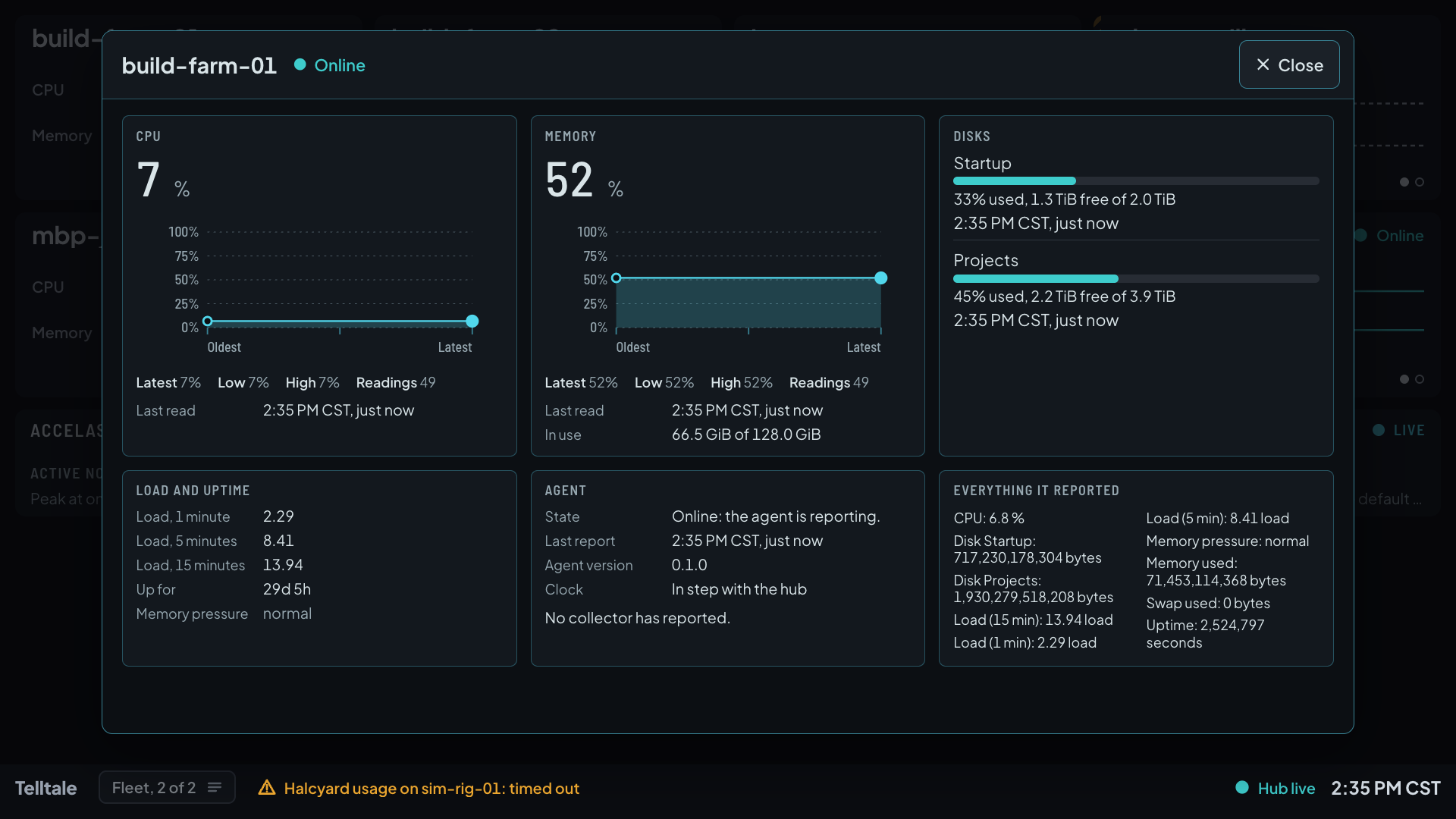
A Mac's large card draws its CPU and memory history with the latest, lowest, and highest values, each disk, the load averages and uptime, the agent's state and version, and everything the Mac reported.
A picker in the bottom strip
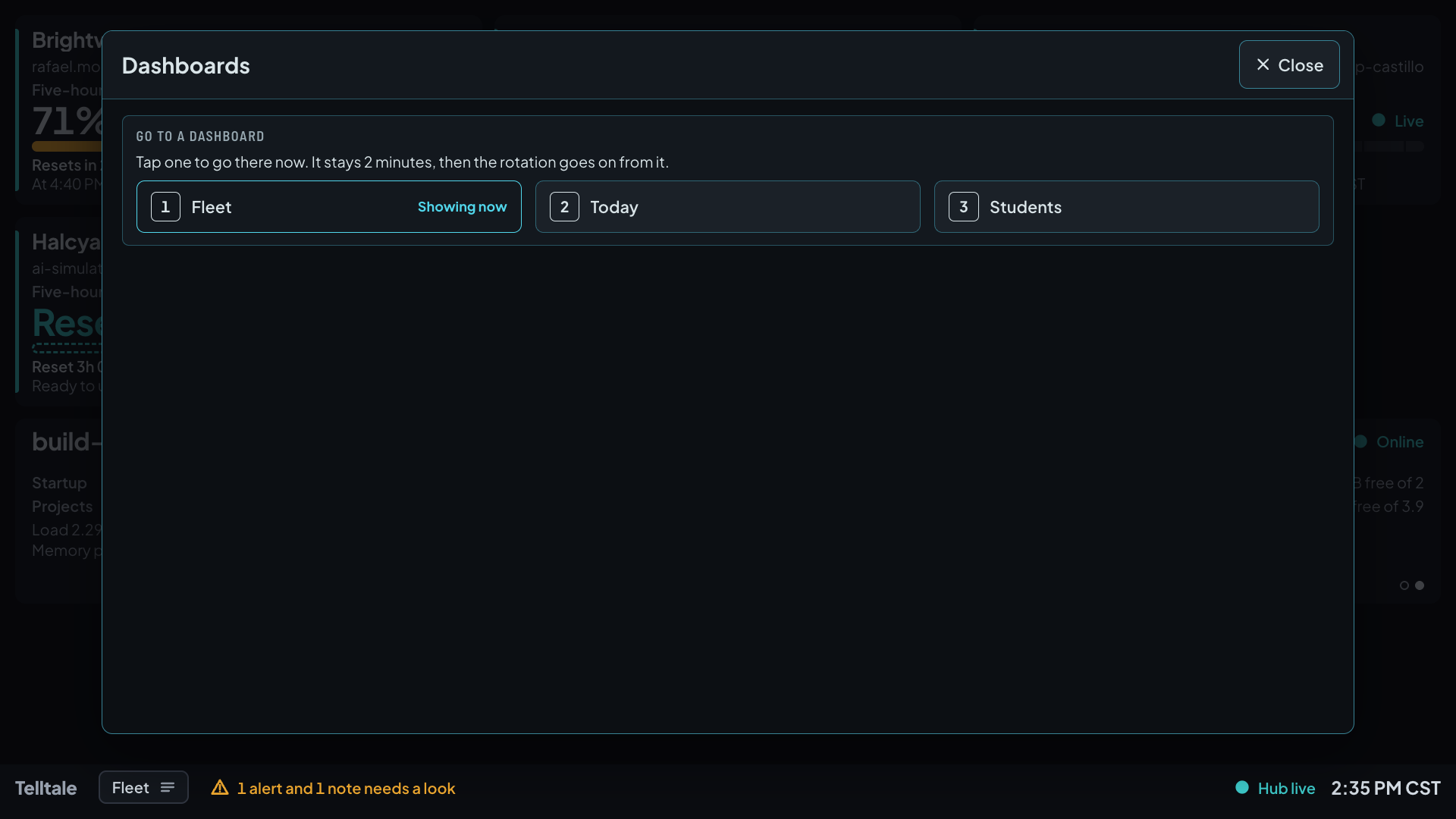
The strip names the dashboard on show and carries a picker. Tap a dashboard and the board goes there and stays 2 minutes, then the rotation goes on from it.
A date, a picture, and an alert that always shows
A large date and time screen
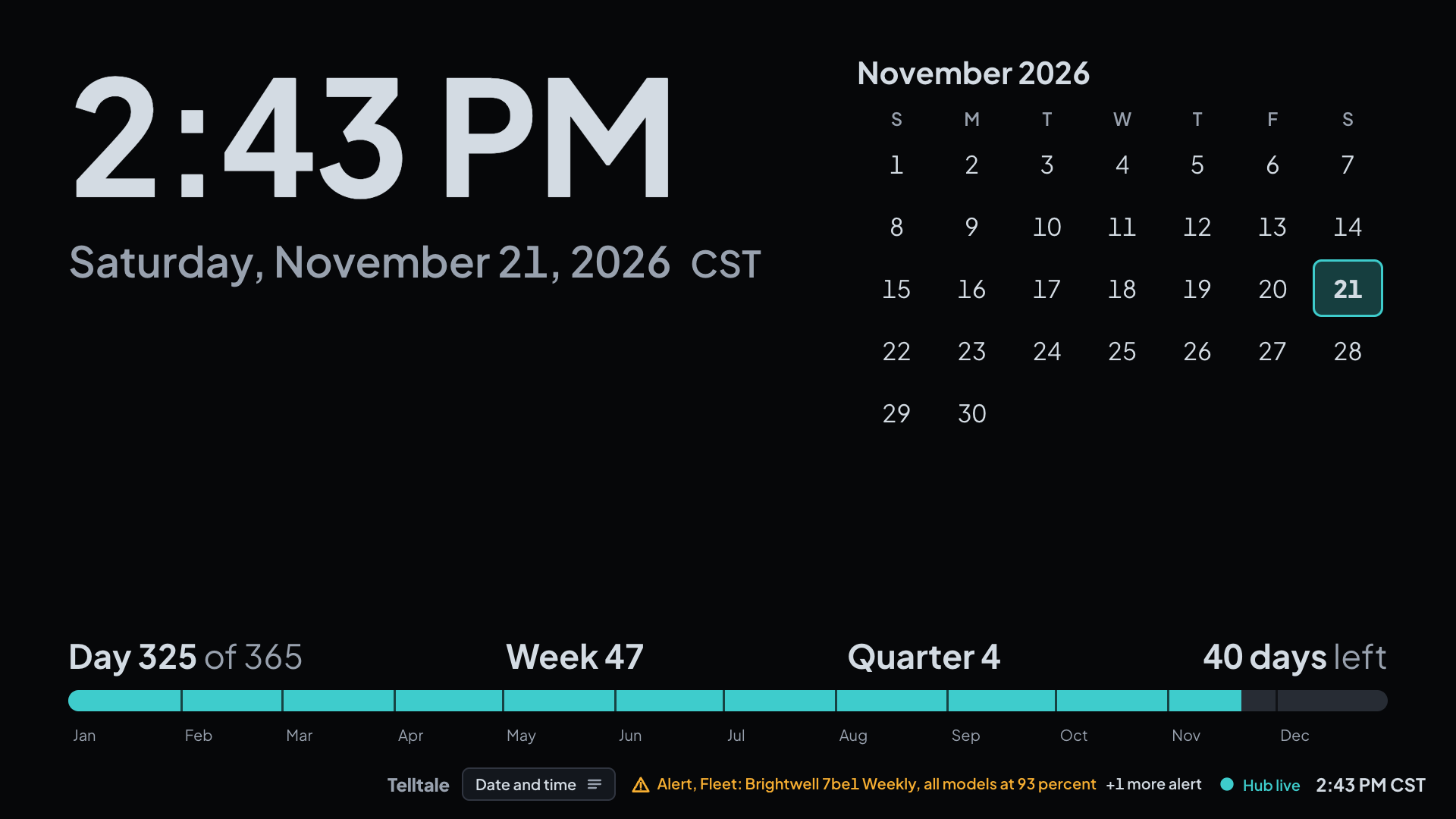
After every fifth turn of the dashboards, one full-screen scene takes 30 seconds. The date and time scene shows the time very large with its zone, the weekday and date, the month calendar with today marked, and the day's place in the year.
- Pictures from a folder you choose
- The other full-screen scene is a picture from a curated folder of artwork the hub serves read only. With no folder there is no picture scene and no error. This site shows none, because the demo has none.
- An alert is never hidden by a scene
- A new alert ends a full-screen scene at once, and an alert that stands rides in a small strip over the scene with its marker and its words. No scene begins within 10 minutes of an alert, on an alert turn, or while the hub cannot be heard.
- Made for a screen that stays on for weeks
- The board never paints pure white or pure black, it moves its small marks, and once an hour a near-black rest frame with only the clock covers it for 20 seconds, to guard a television against burn-in.
An agent on each Mac, one hub, a board in any browser
- A small agent on every Mac
- The agent uses only Python's standard library. It samples CPU, load, memory, and disks, reads each subscription's usage from what a Mac is signed in to, and sends one batch with a heartbeat. A collector that fails is reported as a state and never stops the others.
- A new metric needs no change to the hub or the board
- Add a built-in collector, drop a Python file into the agent's collectors folder, or name any program that prints samples as JSON, and the reading appears on the board.
- No sign-in is kept, refreshed, or changed
- A provider's token is read at the moment of a call and held only in memory. It never reaches a log, a batch, the store, or an error message, and Telltale never refreshes or writes one. A file that holds a sign-in is never opened, and tests booby-trap each such name so an open fails.
- Read only toward every other tool
- Telltale writes nothing into another tool's files, changes no guard or pacer, and never pauses, stops, or steers an agent or a session. A module reads its tool through that tool's own read-only route with a key of its own.
- An outage is survived and said out loud
- When the board loses the hub for 35 seconds it says the hub is unreachable and since when, keeps the last state, and reconnects by itself. When an agent loses the hub it keeps up to 24 hours of batches, capped at 20 MB, and sends them in order when the hub returns.
- Demo mode runs the board on an invented company
- The hub can run on the invented StrataForge Robotics fleet with no network and no key, in a store of its own, with every module title marked (demo data). The installed job cannot turn it on. Every picture on this site was taken this way.
- A registry of the fleet's apps and what each can provide
- A registry lists 47 fleet apps and the 18 data sets they can feed to the board, each marked live, available, or planned, and by who may see it. It holds no key and no value, and the hub serves it.
From a reading to the wall
Collect
An agent on each Mac samples its own CPU, memory, disks, and load, and reads each subscription's usage from what that Mac is signed in to.
Send
One batch with a heartbeat goes to the hub. A batch already accepted is acknowledged and never stored twice.
Keep
The hub stores the latest reading of every metric and every change to a quota, and decides each reading's state when it is asked.
Serve
The hub serves the board and pushes each change to it, behind an access key.
Show
The board fits subscriptions, Macs, and modules on one screen, rotates through scenes when it must, and opens a card on a tap.
Built so everyone can use Telltale.
Telltale's board is a web page built on the Renkara design system, drawn for a television across a room and, for now, in a dark theme only. What we have checked is mostly source and one scripted pass: tests read the stylesheets and compute the contrast of every text color from the stylesheets' own variables, a unit test checks that a card is a native button that opens on Enter and Space, and a browser run scans the pictures of the board with axe-core. No screen reader test has been run, and no one has audited the board against WCAG. Here is what it supports today and what we have actually checked. We do not claim a WCAG conformance level.
Partly supported
Keyboard operation
Every card, panel, and the dashboard picker is a native button laid over its box, so the keyboard reaches it and Enter or Space opens it. The large card is a dialog with a Close button. We have not walked every flow with a keyboard alone.
Not yet tested
Screen reader landmarks and labels
Status is written in words (Live, Held, Reset, Stale, Offline) and never carried by color alone, and each large card is a dialog. None of it has been heard in a screen reader.
Partly supported
Contrast in light and dark
The board's text colors are held to 4.5 to 1 against its page and card backgrounds, computed from the stylesheets' variables, and a scripted axe-core pass over captured views found no serious or critical violation when the pictures on this site were taken. Colors from the design system's tokens that the board does not use for text have not been scanned.
Partly supported
Reduced motion
A screen change is a crossfade that becomes an instant change when a visitor asks for reduced motion, and the browser end-to-end run checks that nothing animates on a page with reduced motion emulated.
Not yet tested
Text resize and zoom
The board is sized in design units to fill a 1,920 by 1,080 screen, with a floor of 20 pixels for labels and 48 for main readings. Browser text resizing to 200 percent has not been tested.
Not yet tested
Mobile and touch
The board is made for a wall display. It is meant to be usable at 375 by 667 pixels as one scrolling page, but nothing was tested at phone width for this site, and the pictures here are all at 1,920 by 1,080.
Under the hood
| Application |
|
|---|---|
| Data |
|
| Privacy |
|
| Display |
|
| Tests |
|
Questions people ask
Is Telltale available to other teams?
No. Telltale is internal to Renkara and is not offered for sale. There is no install or download button on this site, no sign-up, and no price. This site shows what it does and how it is built. Write to fleet@renkara.com with questions.
Can the board change anything?
No. The board only shows. Tapping a card opens a larger card with more detail, and nothing on it changes a subscription, pauses an agent, or steers a session. Telltale writes nothing into another tool's files.
Does it keep my sign-ins?
No. A provider's token is read at the moment of a call and held only in memory, never written to a log, a batch, or the store, and never refreshed or changed. Files that hold a sign-in are never opened, and tests booby-trap each such name so an open would fail.
What happens when someone switches accounts on a Mac?
The old subscription keeps its last reading, marked Held, with the time it was read and a countdown to its reset. When the reset time passes it reads Reset and Ready to use again. The held number can trail the true one by what was used in the last poll before the switch, and the card says when it was read.
What does the board do when the hub goes quiet?
After 35 seconds without a signal from the hub, the board says the hub is unreachable and since when, keeps showing the last state, and reconnects by itself. Meanwhile each agent keeps up to 24 hours of its batches, capped at 20 MB, and sends them in order when the hub returns.
Why is there no light theme?
The board draws a dark theme only for now, because it lives on a wall display that stays on for weeks. The light theme is suspended, not removed. For that reason every picture on this site is a capture of the dark board, and the one the site shows in its light theme looks the same.
What do the tests prove?
The rules and the plumbing: how a reading's state is worked out, what each module's source may read, that no token is kept, how the board fits and rotates, and how a card opens, against fixtures and fakes. A separate live check, run by hand, tests real sources on the day it runs, so the suite says nothing about whether a provider's usage reading is available on a given day.
Is the data in the screenshots real?
No. Every screenshot is a capture of the built board served by a hub in demo mode, over the invented fleet of StrataForge Robotics, a fictional company: its Macs, its people, its three providers, and every figure were written for the demo, and the module titles say (demo data). The hub made no network call and read no key, and nothing real was on the screen.
Questions about this tool?
Write to Renkara Media Group and a person will answer.